
2. Product Create V1
This service is used for creating your products to the Trendyol system through method POST
**Product V1 services will be unvalid starting from 15th October2026. You need to finalize Product V2 service developments on your end.
- You need to send "storeFrontCode" as Header Parameter.
- The maximum number of items that can be sent in each request is 1000.
- The product can be created without any stock, so that the stock will be 0 when product first created.
- You can only update stock through the stock update service.
- After product approval, color information can not be updated
- The attributes which slicer or varianter are true, cannot be updated after product approval
- "listPrice" cannot be lower than "salePrice"
- "stockCode" in product data, equals to "merchantSku" in order data. It can be checked in getShipmentPackages service.
- "shipmentAddressId" and "returningAddressId" are only eligible for the storeFrontCode "SA" and "AE".
- Following a successful product create request, product approval process starts. Products that are under approval or rejected will not go live. In this case you need to check product status through the productFilter service.
While createProducts, updateProducts, updatePriceAndInventory methods are processed by the queue in Trendyol System, a batchRequestId information is returned in each successful request result. By checking the "status" field in the return of the batchRequest service, you can check whether the batch has been completed. If an item in the batch results has an error, the failureReasons field can be checked to see error reason
HTTP method: POST
Service Parameters and Rules
| Parameter | Required | Description | Data Type | Max. Number of Characters |
|---|---|---|---|---|
| barcode | Yes | As a special character "." , "-" , "_" can be use. You may use Turkish characters (ğ, Ğ, Ş, ş, İ, Ü etc.). If there is a space in the middle of your barcode, it will be combined and imported. You should also make your stock-price updates according to the imported barcode. digits. | String | 40 |
| stockCode | No | Stock code in supplier's internal system | string | 100 |
| origin | No | Country of origin information of the product. You can find valid 2 digit codes here. | string | 2 |
| title | Yes | Product name | string | 100 |
| productMainId | Yes | When creating a varianted product, it is needed to send productMainId same in order to group the variants of the product. Corresponds to the Model Code in the Seller Panel. | string | 40 |
| brandId | Yes | Trendyol Brand ID Information. | integer | - |
| categoryId | Yes | Trendyol Category ID Information. | integer | - |
| quantity | Yes | The amount of stock | integer | - |
| description | Yes | Product description information | string | 30.000 |
| salePrice | Yes | Product sales price | number | - |
| listPrice | No | Product original price. It is the price crossed out when the selling price is low. | number | - |
| vatRate | Yes | Available Store Front Codes document should be check | integer | - |
| shipmentAddressId | No | Product shipment address (only eligible for the storeFrontCode "SA" and "AE") | number | - |
| returningAddressId | No | Product return address (only eligible for the storeFrontCode "SA" and "AE") | number | - |
| images | Yes | It is the URL address list of product images. Visual URL addresses must be SSL certified addresses in "https" format. Maximum 8 images can be added for a barcode. The dimensions of the images of the products must be 1200x1800 and 96dpi. | List | - |
| attributes | Yes | It is the property (Specification/Attribute) information of the product that can be sent for Category information. | List | - |
| deliveryDuration | No | Shipping Lead Time (You may enter a barcode-based shipping lead time within the intervals specified by our operations teams. If left blank, your default lead time will be applied to the barcode.) In order to define “Same Day Shipping” value to be entered as 0. In order to define “Ship by Next Day” value can be entered as 1. | integer | - |
| cargoProviders | No | If you want to define a shipping company based on barcode, you can use one of the shipping companies returned from the service in the link. | string | - |
You can use the brand & category below not to affected by missing definitions on stage environment
| BrandId | CategoryId |
|---|---|
| 313003 | 975 |
| 16 | 975 |
| 8117 | 958 |
Sample Service Request
{
    "items": [
        {
            "barcode": "string",
            "stockCode": "string",
            "origin": "AD",
            "title": "string",
            "productMainId": "string",
            "brandId": 0,
            "categoryId": 0,
            "quantity": 0,
            "sgrPrice": 1.5, // only for Romania and related categories
            "description": "string",
            "salePrice": 0,
            "listPrice": 0,
            "cargoProviders": ["cargo company code"], // it can be used for only SA and AE storefront
            "vatRate": 0,
            "shipmentAddressId": 0,
            "returningAddressId": 0,
            "deliveryOption": {
                "deliveryDuration": 1,
            },
            "images": [
                {
                    "url": "string"
                }
            ],
            "attributes": [
                {
                    "attributeId": 47,
                    "customAttributeValue": "Red"
                },
                {
                    "attributeId": 3,
                    "attributeValueId": 998
                }
            ]
        }
    ]
}
Sample Service Response
{
  "batchRequestId": "8d30c8d3-0800-11ed-8fdd-cac59bbd2b08-1658317798"
}
Product Variant Creation
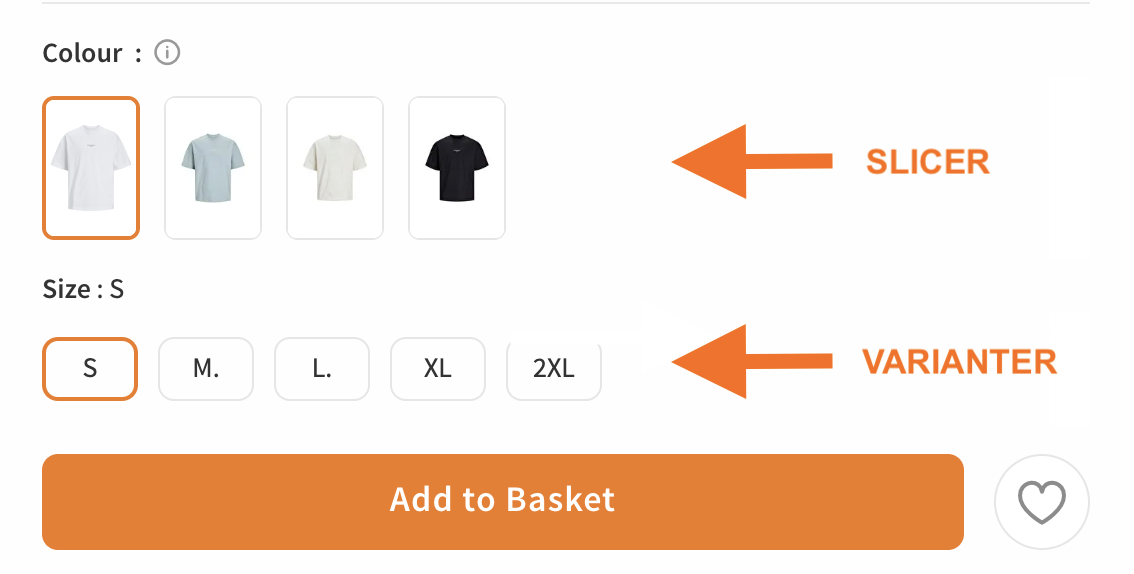
The product variantation process is based on the 'productMainId' value. The 'slicer' and 'varianter' values should be checked through the relevant category attribute service.
- To be able to variant a product, all values except the barcode and the property to be variant, must be kept the same for the relevant product.
Product Variant Creation by Slicer Value (Product color value, product memory value, etc.)
The product is opened in different contents, and the most commonly used value as a Slicer in the system is color. However, in electronic categories, for the product to be opened in different contents (such as internal memory), it can be used as a Slicer value. (The category attribute service should return slicer=true.)
- In a category, there can be multiple slicer values.
- Since the slicer value opens the product in different contents, it can be used as a variant.
Product Variant Creation by Varianter Value (Product size value, etc.)
These are different sizes of the same product listed within the same content. It does not open the product in different contents. Only one variant can be selected for each category.
- Multiple selections are not allowed.

Updated 5 days ago